So you just bought your first cruiser and opened up the fitting service and.... Realized you haven't the faintest what you're doing. Well have no fear, I am well give you some typical layouts for fits in this guide that should get up and running for whatever your space-faring heart desires.
Now there are some main things you can fit a ship for these being:
MissionsPVP (player versus player)
MiningExplorationIncursionsNow for the sake of this guide, I'm going to assume you're fitting your new cruiser for missions. Why? Because as a new player missions are the easiest and most straightforward way to make isk. Mining being second, but mining efficiently is a bit less straightforward and I now close to nothing about it... Mostly that latter part. >.>
Anyway, firstly, you should open up your fitting screen by hitting alt-f preferably. There is also a button on the sidebar for those of you who can't be bothered to use hotkeys. Now it will look like this.
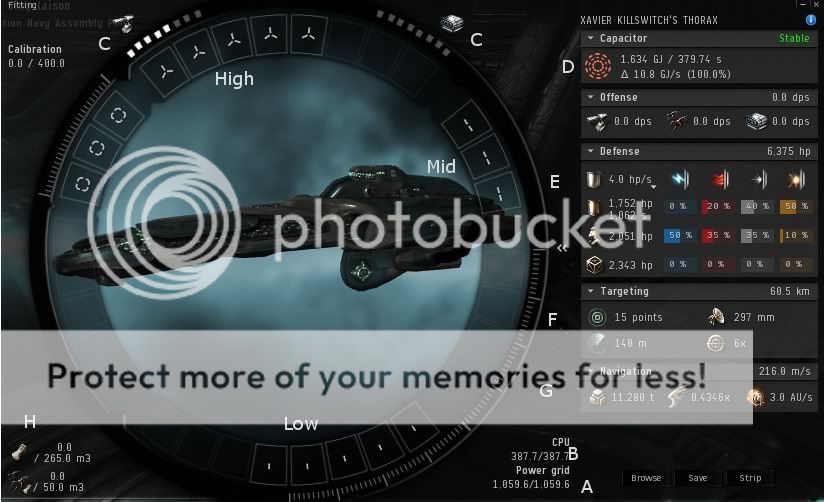
Now there is a lotttt of information there so I'll break it down as best as I can.
I'll start with the slots:
Low Slots - These slots are used for modules that affect the ship itself usually, stuff like, reactor control units, nanofibers, cpu upgrades and weapons upgrades which consists of, gyro-stabilizers for projectile weapons, heat-sinks for laser weapons, magnetic field stabilizers for hybrid weapons and finally ballistic control units for missiles. This is also home to armor tanking, which is one of two forms of tanking in EVE. These slots are where you fit armor plating, armor hardeners and armor repairers.
Mid Slots - These slots are most often used for utility modules, such as stasis webifiers, warp scramblers/disruptors , tracking computers, and cap rechargers/boosters to name a few. This is also where you would shield tank. You put your shield boosters, shield hardeners, and extenders here.
High Slots - These slots are for offense purposes, this is where the aggro happens, you fit your guns and missile launchers here, as well energy vampires/neutralizers, sensor dampeners and drone links.
Now that we have broken down the slots for fitting and their general use, I'll tell you about some of the other info in this window.
A. This is your power grid, which is one of three primary fitting stats. This annoying little stat dictates the limits of what you can fit for a ship. Every module in the game requires power to use, which means you want as much of it as possible. There is going to be quite a few times in your EVE career where the power grid is going to be your worst enemy, so best to get used to it. Now the best way to get as much base power from every ship is to go train
Engineering to 5. Seriously, if you don't have it go train it to 5 now. It only takes 5 days from 1 to 5 so you have no excuse not to have it 5. Secondly there are reactor control units that you can fit into low slots that that boost your power grid, but
a good fit does not need this, remember that.
B. This is your CPU, which is the second of the three primary fitting stats. The CPU is another limiting factor about what a ship can fit, but not quite like the power grid is, it's slightly more complicated. Most modules in the game require CPU as well, but, unlike power grid, these modules usually fall into one of two extremes, either very little CPU at all, or a lot of CPU. Things like weapon upgrades, and warp scramblers require quite a bit of CPU, where as armor plates and passive hardeners don't. Basically the CPU of your ship regulates how many "active" or "complicated" things your ship can have. Basically. To get the most out of your CPU train
Electronics to 5
C. These are your weapons slots. It's pretty straightforward, just count the number of white square underneath each respective icon and now you know how many turret/launcher hard-points you have on your ship. By the way this is fixed, you cannot change it.
D. This is the capacitor, the third and final of the primary fitting stats. The capacitor tells you how much energy you have for modules that require you to hit the F1 through F8 keys use. Now the capacitor also has a recharge rate which dictates how much energy it gets per recharge cycle. If you go over the amount of energy it gets back, causing it to be unstable, it will eventually run dry. Notice how there is a green stable sign in the upper right of that tab. That's telling me I'm currently not going over the recharge rate. There are a few ways to up the recharge rate, cap rechargers, capacitor recharge relays, and capacitor control circuit rigs (CCC's). The idea for running missions is that you want to be stable when running your tank and your guns, if you have extra modules outside of that, they don't necessarily need to fall into the stable range. There are only a few skills that pertain to the capacitor itself and numerous ones that influence it indirectly through modules.
Energy Management will give you more cap points and
Energy Systems Operation will give you a better recharge rate.
E. This is your defensive stats tab. Here lists your resists to the four damage types as well as the amount of armor/shield/structure points you have. As well as your shield recharge rate. I'll be focusing on armor tanking mostly, primarily because I'm the most familiar with it and because CROATOAN favors armor tanking in our ops. Now for a mission tank we use what is called an
Active Tank which is a tank is based on having high resists to mitigate incoming damage and it requires cap to run. Active tanks are made up of armor hardener to actively boost resists when they are on and one or more armor repairers to regenerate armor points. For most missions you will try to tank specific damage types being fired at you. There are a number of skills pertaining to these stats:
Mechanic,
Hull Upgrades,
Repair Systems,
Shield Upgrades,
Shield Compensation,
Shield Operation, and
Tactical Shield Manipulation.
F. This is your targeting tab, which tells you how far away you can target and how many targets the ship you are flying can target. It also tells you your sensor type and scan resolution, which these stats aren't in the scope of this guide.
Targeting and
Long Range Targeting will help you boost these stats
G. This is your cargo hold and drone bay stats. Which simply tell you how much stuff you can cram in your hold, which is import for transport ships and not so important for mission ships. As well as how many drones you can fit your drone bay. Drones are a pretty extensive subject that I won't be covering in this guide either.
That covers pretty much all the basics for fitting tab info. I didn't cover rigging your ship, because at this point rigs aren't necessary for you as a new player, but once you start doing L3 or L4's or getting a couple mil in sp you should start looking into them, they play a big role later on in fitting.
-----------------------------------------------------------------------------
Now I'll post a fit for a missioning Thorax here so you can get a feel for how they look in a forum setting:
[Thorax, PVE]
Medium Armor Repairer I
Armor Thermic Hardener I
Armor Thermic Hardener I
Armor Kinetic Hardener I
Magnetic Field Stabilizer I
10MN Afterburner I
Cap Recharger I
Cap Recharger I
200mm Railgun I, Thorium Charge M
200mm Railgun I, Thorium Charge M
200mm Railgun I, Thorium Charge M
200mm Railgun I, Thorium Charge M
200mm Railgun I, Thorium Charge M
Hammerhead I x5As you can see it goes Low Slot, Mid Slot, High Slot, then Riggings (which we have none so it doesn't show up) and finally drones.
This is what a basic mission set-up looks like as well. So if you wanted to you could probably use it.

Cheers Mates, happy flying.
 Home
Home Search
 Login
Login Register
 Show Posts